SUPPORT COPILOT · Categorize · Assist · Deflect

Support Copilot

Every agent answers
like your best agent.

Every ticket gets read, tagged, and routed the moment it lands, and every agent gets a suggested reply and the right article inside Zendesk. Once your knowledge base is strong enough to trust, the routine tickets resolve with no human in the loop — and every ticket you can't answer yet becomes a signal for what to fix next, instead of dying in a queue. Nothing unlocks until your KB earns it.

Zendesk native Zendesk Guide Confluence ZAF Agent Panel
0
Compliance Profiles · CJIS · HIPAA · TCPA · GDPR · FHA
0
Roles On The Access Ladder · Agent → KB Owner → Admin → Partner → Staff
0
Ways The AI Works · Drafting Replies · Classifying & Routing
Gated by KB quality
Deflection Rate / Time-To-Resolution
What It Does

One ticket.
Four things handled.

Support Copilot reads and tags every ticket the moment it lands, surfaces a suggested reply and the right article inside the Zendesk agent workspace, resolves the routine ones on its own once your KB is ready, and clusters what it can't answer so your knowledge base keeps getting better. Categorize, assist, deflect, learn — in that order, and only as far as your KB earns.

Step 01

Categorize + Route

Every ticket, sorted before a human sees it.

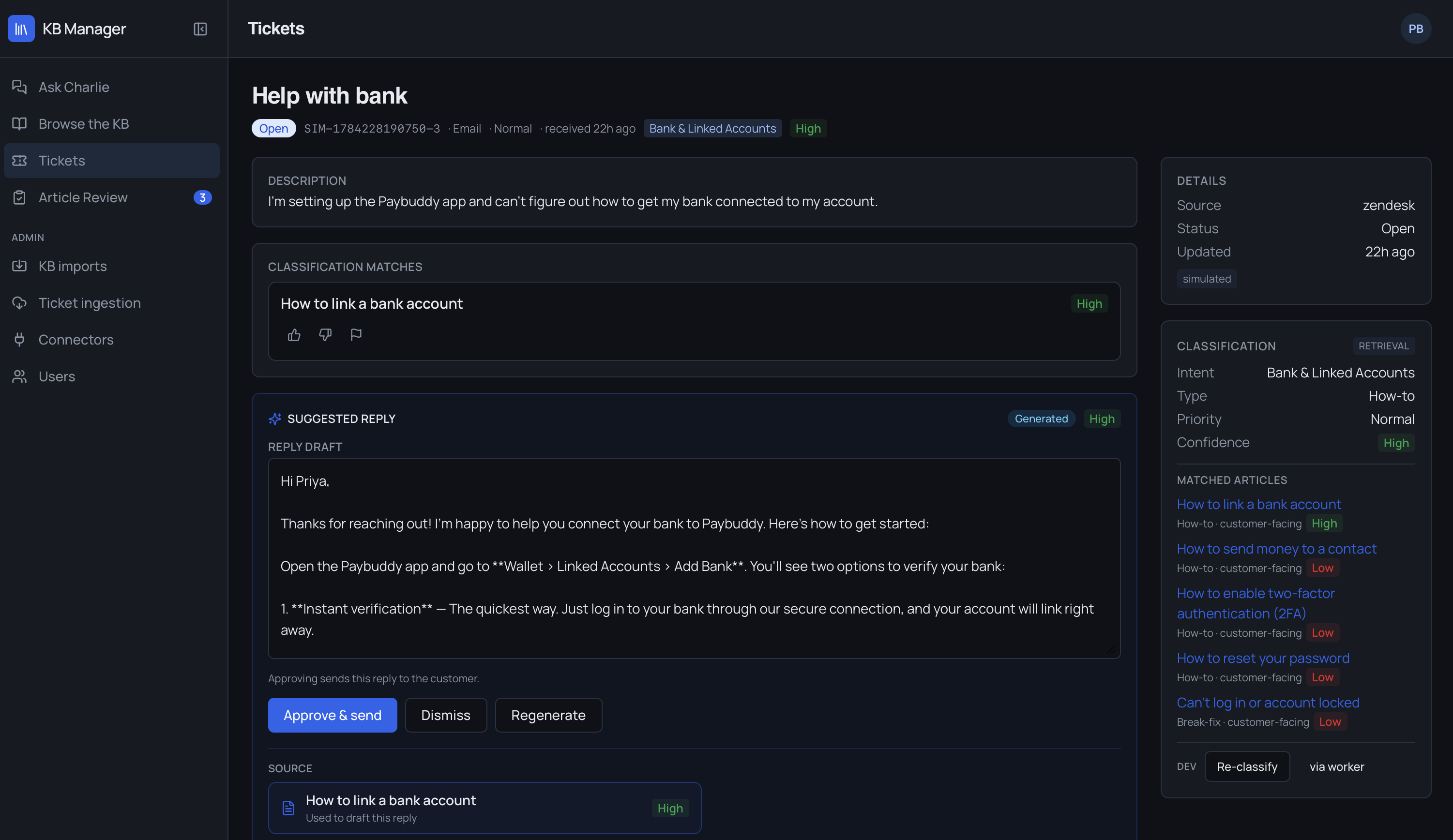
The moment a ticket lands, Support Copilot tags it and routes it to the right queue or team. Agents review the classification and confidence score, and can override it in one click when the AI gets it wrong.

  • Automatic tagging and categorization on arrival
  • Routed to the right queue or team, not a shared inbox
  • Confidence score shown — override anytime
Step 02

Assist in the Agent Panel

The suggested reply, right inside Zendesk.

A panel embedded directly in the Zendesk agent workspace shows the AI-suggested reply, the relevant KB articles, and past-ticket context — all without the agent leaving the ticket. Accept it, edit it, or dismiss it.

  • Native ZAF panel — no separate login, no context switch
  • Suggested replies drawn from your KB
  • Past-ticket context surfaced automatically
Step 03

Deflect the Routine Ones

Once your KB is ready, it answers on its own.

Configure rules for which ticket types are eligible for an automatic public reply. Support Copilot drafts and sends the response directly from KB content — for the tickets your knowledge base can actually support. Review deflection activity and outcomes any time.

  • Rules-based triggers for automatic public replies
  • Drafted and sent directly from KB content
  • Won't make things up — escalates to a human when the KB can't back an answer
  • Full visibility into what was deflected, and how it landed
Step 04

Learn from the Gaps

It tells you what your knowledge base is missing.

Support Copilot clusters unmatched tickets to surface coverage gaps — the questions your KB can't answer yet — and can generate new draft articles straight from those ticket patterns.

  • Coverage-gap detection from unmatched ticket clusters
  • New KB articles drafted from real ticket patterns
  • Full article lifecycle: publish, update, deprecate

Staged by knowledge base quality.
On purpose.

Most AI support tools turn on every feature the day you install them, whether or not your knowledge base can support it. Support Copilot doesn't. Deflection and agent-panel suggestions stay off until your knowledge base clears a coverage threshold — so an org with a thin KB gets categorization and routing on day one, and earns its way into higher-risk automation as its knowledge base actually gets good enough to trust. No manual retraining required — the gate lifts on its own as ticket volume builds out proven KB coverage.

  • KB coverage gates access to deflection and suggested replies
  • Prevents bad AI answers caused by sparse or outdated knowledge bases
  • The bar to unlock isn't a sales decision — it's a data threshold every org clears the same way
Support Copilot ticket detail: classification matches, AI-suggested reply draft, and matched knowledge base articles
The Platform Underneath

Five surfaces.
One knowledge base underneath.

Knowledge Base — KB Manager + Internal Q&A

The foundation every other surface reads from. Import articles from Zendesk Guide or Confluence, generate new articles from ticket patterns, and manage the full lifecycle — publish, update, deprecate. Agents run internal Q&A searches against the KB directly (agent-facing only, never shown to customers); coverage-gap detection flags clusters of unmatched tickets.

New-Ticket Categorization & Routing

Every ticket tagged and categorized the moment it arrives, then routed to the right queue or team automatically. Agents see classification confidence and can override — nothing is a black box.

Zendesk Agent Panel

A ZAF panel embedded in the agent workspace. Suggested replies from the KB, relevant articles, and past-ticket context without leaving Zendesk. Authenticates via ZAF token exchange — no separate login. Accept, edit, or dismiss any suggestion.

Ticket Deflection

The most autonomous surface, most tightly gated. Configure rules for which ticket types trigger an automatic public reply; Support Copilot drafts and sends from KB content. Every deflection logged; activity and outcomes reviewable any time.

Config & Admin

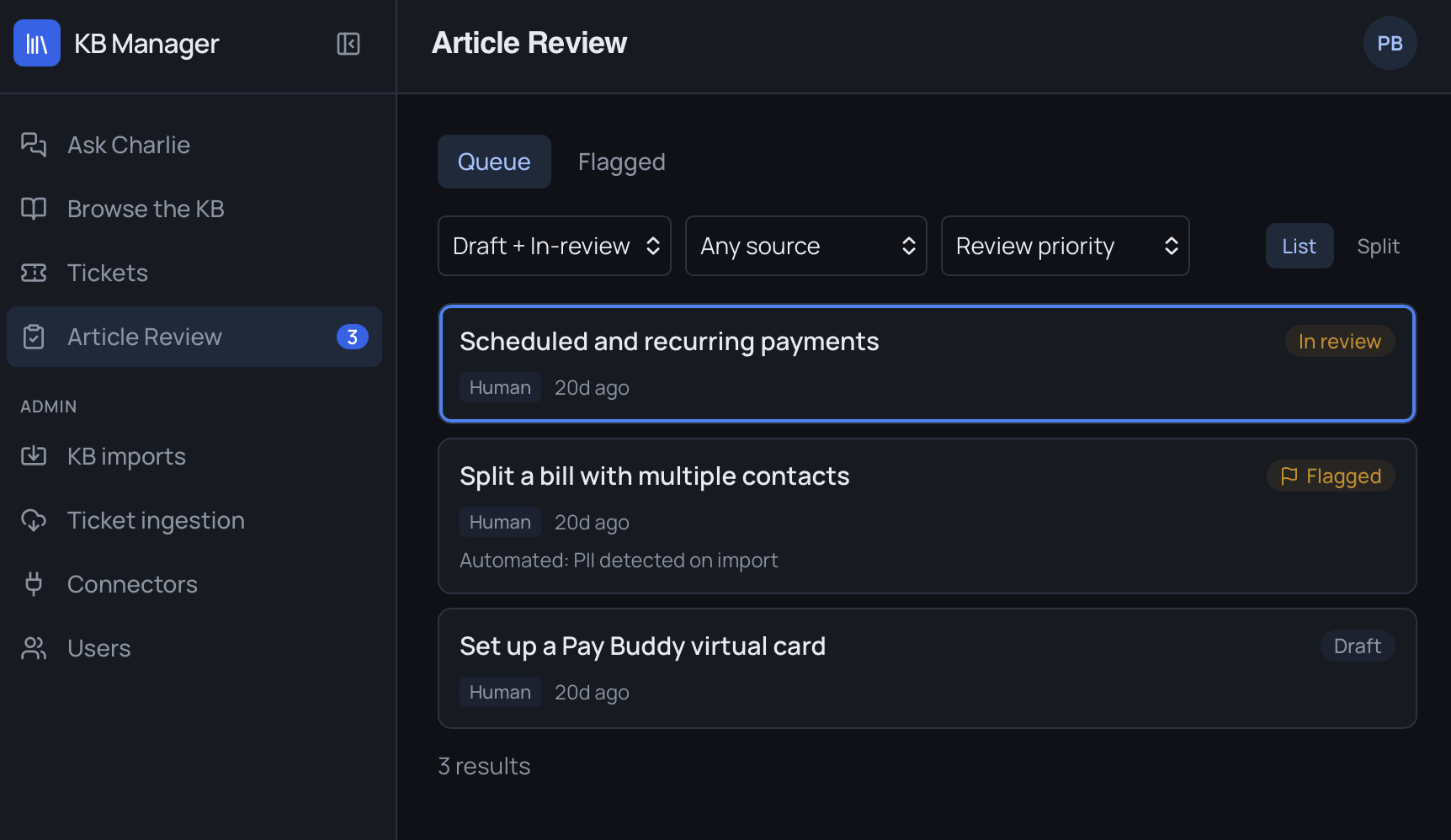
The control plane for org admins and CharlieIQ staff. Compliance profiles — CJIS, HIPAA, TCPA, GDPR, FHA — gate PII storage and audit behavior. Zendesk webhooks. Role ladder (Org Agent → Org KB Owner → Org Admin → Partner Admin → SC Staff). Org switcher for internal staff. Full audit trail of every system, user, webhook, and agent-panel action.

Support Copilot KB Manager article review queue, showing draft and flagged articles awaiting review

Built for support teams.
Gated by design.

Every surface is scoped to what your knowledge base can actually back up — and everything an agent, an admin, or the system does is written down. No guessing from a thin KB, no new tab to babysit, no untraceable actions.

  • Gated by design. Deflection and panel suggestions don't unlock until your KB clears the bar — never a guess from a thin knowledge base.
  • Lives inside Zendesk. The agent panel is native to the workspace your team already uses. No new tab, no new login.
  • Compliance-ready. CJIS, HIPAA, TCPA, GDPR, and FHA profiles gate PII storage and audit behavior per org.
  • Role-based from day one. A five-tier role ladder from individual agent up through partner and internal staff, with org-switching for multi-account management.
  • Every action logged. System, user, webhook, and agent actions all write to a full audit trail.
  • AI-drafted, human-approved. Replies and KB articles come drafted for your review; classification and Q&A run automatically — each task handled by AI tuned for the job.
Get Started

Turn on categorization today.
Earn your way into deflection.

Connect Zendesk. Import your existing KB from Zendesk Guide or Confluence. Categorization and routing go live immediately — deflection and agent-panel suggestions unlock as your knowledge base proves it's ready.

Tell us where to point it
Add your name so we know who we're meeting.
Enter a valid work email.
Which company are we setting this up for?
Select your team size.
Which tools do you want to see? *
Pick at least one tool to see.

We'll only use this to set up your walkthrough. You approve every next step.

Request sent!

Your request is in — we'll be in contact shortly to schedule your live demo. Nothing runs against your systems until you approve it.

Back to overview
Zendesk native Compliance profiles: SOC 2 · HIPAA · GDPR KB-gated automation