CALLPILOT · Real-Time Sales Coaching

CallPilot

A coach on every call
reps ramp instantly.

Conversion sits flat, managers review a handful of calls, and 'it's the ramp' becomes the answer no one can disprove. CallPilot listens on every call and coaches the rep in under three seconds — competitor named, objection raised, discovery beat skipped — then grades the call against your rubric and writes the follow-up and CRM update itself. Ramp stops being an excuse and becomes a measurement.

Zoom Teams Google Meet Silent meeting bot HubSpot Salesforce Pipedrive GoHighLevel
0
Card In Front of Rep
0
Calls Auto-Graded
0
Follow-Up Email, Ready to Send
0
CRMs Written To, Not Through
What CallPilot Does

Four jobs. One call.
All while you're talking.

CallPilot joins as a silent participant. It listens for what matters, coaches the rep on their screen alone, grades the call against your methodology, and writes the whole thing into your CRM before the rep is back at their desk. The rep talks. The work happens. Managers get the same view — across every call their team takes, without sitting in on a single one.

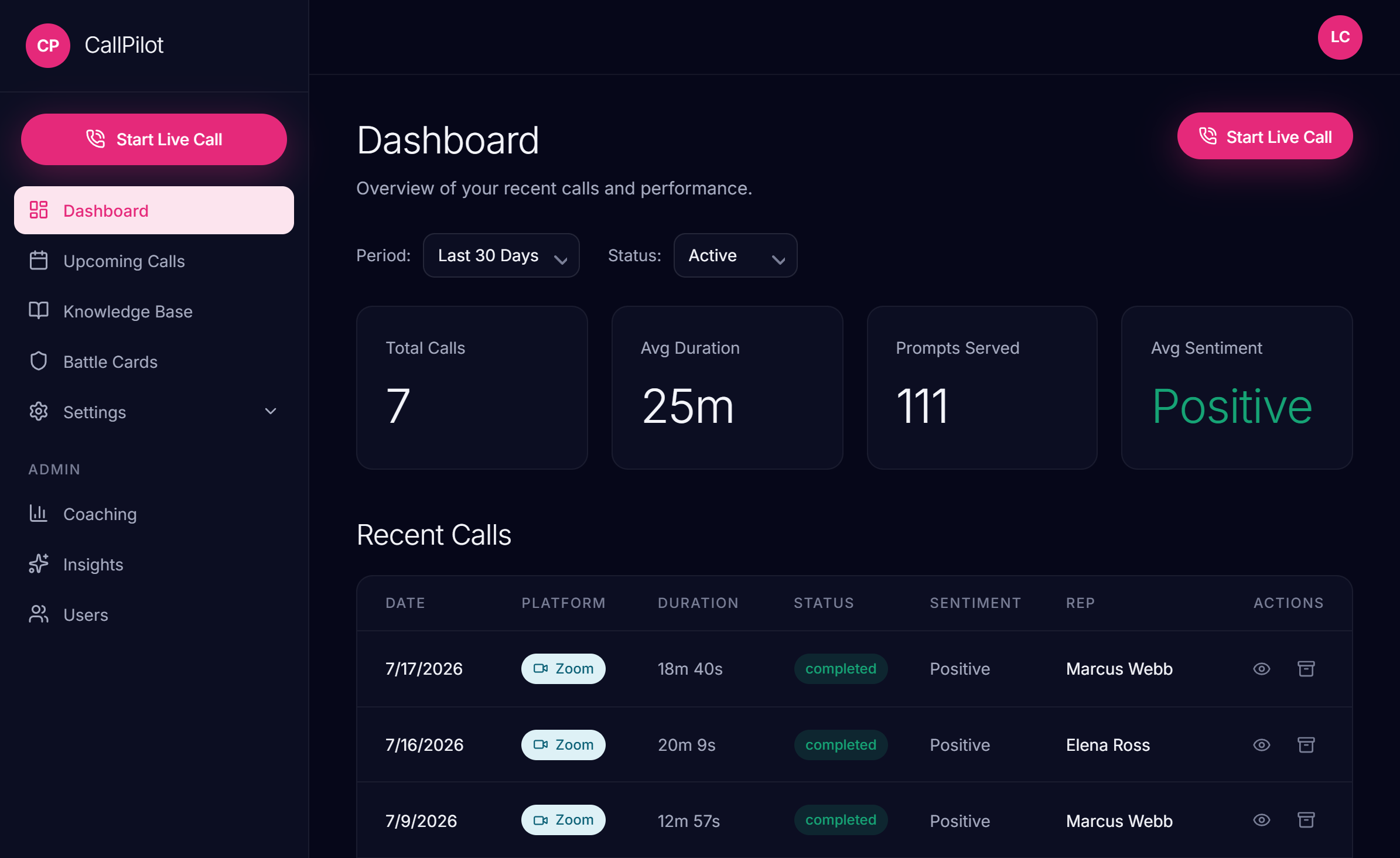
CallPilot dashboard: total calls, average duration, prompts served, average sentiment, and recent call history
During the call

Listen + Coach

Hears the moment. Surfaces the answer.

The prospect says "your competitor came in at $48K." Three seconds later, a card lands on the rep's screen with your real differentiator and the TCO reframe. Pulled from your battle cards, grounded in the deal's history, invisible to the prospect.

  • Pricing pushback → ROI counter from the KB
  • Competitor named → differentiator card on screen
  • Discovery beat skipped → next question, suggested
As it happens

Track + Score

A live readout of how the call is going.

Sentiment curve, talk-ratio, methodology coverage — updated in real time, visible to the rep. When the prospect signals movement, the CRM stage advances by itself. The rep keeps both hands on the conversation.

  • Sentiment timeline and talk-ratio, live
  • Graded against your custom rubric — up to 10 categories, 10 items each
  • CRM stage advances on a real buying signal
After the call

Summarize + Follow up

Everything after the call. Done before they close the laptop.

The moment the call ends, the rep gets a scorecard with quoted moments, a list of agreed next steps, and a follow-up email written in their voice, citing the specific things the prospect actually said. One click to send. No "I'll get to it tomorrow."

  • Scorecard with the moments that mattered, quoted
  • Follow-up email drafted per prospect, in your voice
  • Calendar links and the right collateral pre-attached
Always learning

Learn + Adapt

Calls turn into CRM data. CRM data turns into playbooks.

Stages, properties, notes, and next-steps go directly into HubSpot, Salesforce, Pipedrive, or GoHighLevel — no copy-paste, no missing context. Across every call your team takes, CallPilot watches the pattern: which objections lose, which talk-tracks win, which questions correlate with closed-won. Battle cards update themselves.

  • Native HubSpot, Salesforce, Pipedrive, GoHighLevel — properties written directly
  • GoHighLevel auto-syncs on every call finalization
  • Win/loss pattern detection across the whole team
  • Battle cards refresh as objections evolve
The Scorecard

The post-call read.
In one page.

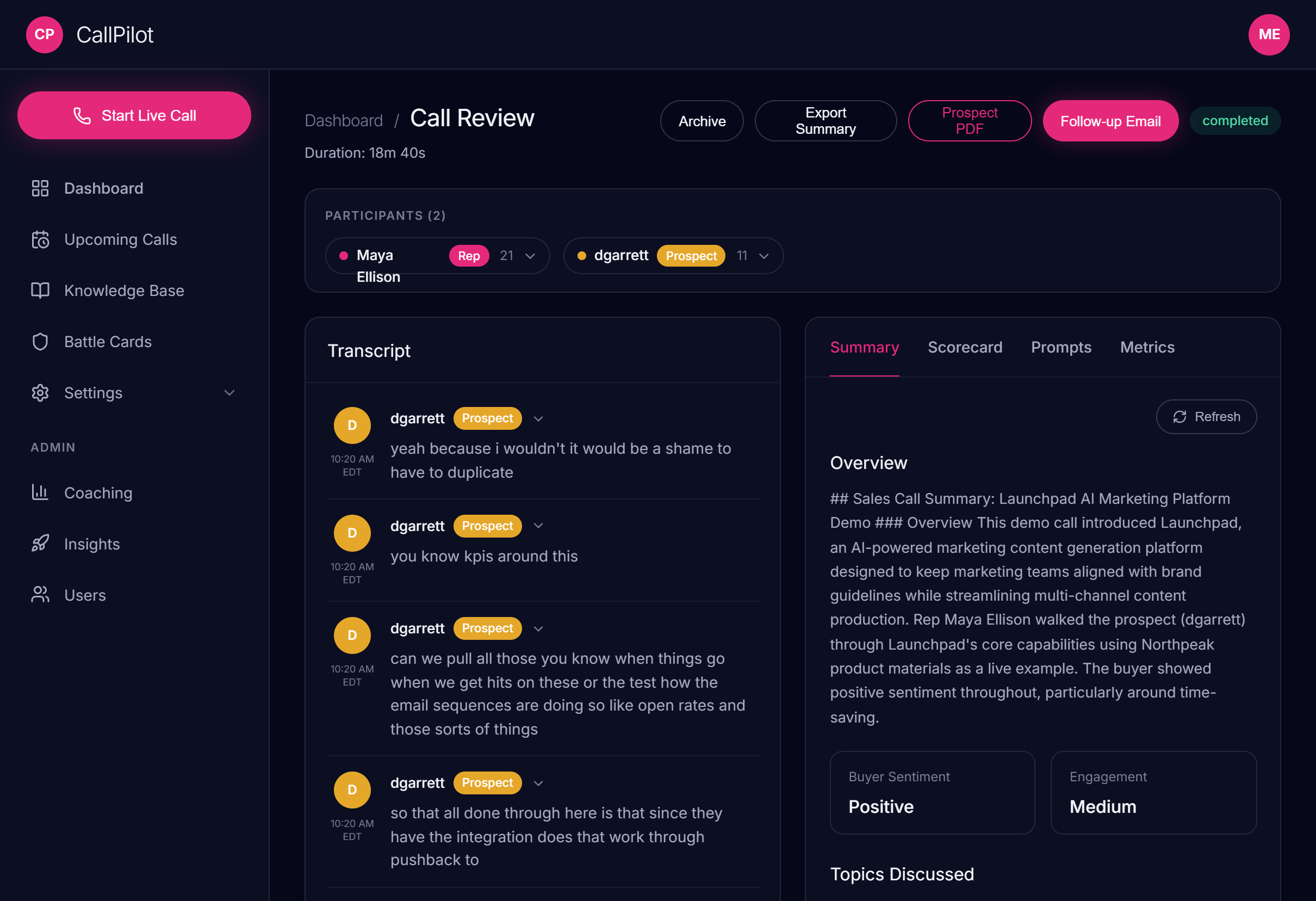
Nobody on your team has time to relisten to forty hours of calls. CallPilot lands a one-page verdict in the rep's inbox: the moments that mattered (quoted), how the conversation tilted (sentiment), what got covered (methodology), and three specific things to do differently next time.

  • The moments that mattered, quoted and tagged
  • Methodology coverage — what landed, what got skipped
  • Three specific things to try on the next call
  • Benchmarked against the rep's baseline and team average
CallPilot call review: transcript, AI-generated call summary, buyer sentiment, and engagement level
What the Cards Read From

Grounded in your docs.
Not the internet.

A prompt card is only as good as the source it cites. Every card CallPilot surfaces — every objection handler, pricing answer, and competitor differentiator — reads from a Knowledge Base and Battle Card library you control. If your KB can't back it, the card doesn't fire.

Knowledge Base

Upload PDF, DOCX, CSV, TXT and CallPilot indexes them into your Knowledge Base. Sync Intercom Help Center articles. Crawl a full website by root URL and toggle individual articles on or off. Every card cites this. Every Q&A pulls from this.

  • PDF, DOCX, CSV, TXT upload with automatic chunking
  • Intercom Help Center OAuth sync
  • Website crawler with per-article on/off toggle
  • Documents assigned to categories to surface on the right call types

Battle Cards

Create competitive intel cards three ways: manually, by pointing at a competitor's URL (auto-scraped), or by bulk-creating up to 20 at once. You can also upload existing PDF, DOCX, or TXT battle cards you already have. Re-scrape any card to refresh it. Re-synthesize the AI content whenever the competitor changes — your manual notes persist across every regeneration. Publish or unpublish to control what fires on live calls. When a competitor is named mid-call, the right card fires automatically — in under three seconds.

  • Auto-scrape from a competitor URL or bulk-create up to 20
  • Upload existing PDF/DOCX/TXT battle cards
  • Manual notes persist across AI regenerations
  • Publish/unpublish to control what fires on live calls
Scheduled Calls

Prepped before
the call starts.

CallPilot syncs the next seven days of your Outlook / Microsoft Graph calendar and pulls each event into an upcoming-calls queue — extracting the meeting URL from the invite body along the way. For any call on the list you can toggle auto-join with a bot, run AI pre-call research from the prospect's company URL, and pull deal and contact context straight from HubSpot, Salesforce, Pipedrive, or GoHighLevel before you dial in. Every call starts with the deal context, contact history, and prospect research already loaded — not buried in another tab.

  • Outlook / Microsoft Graph 7-day calendar sync
  • Auto-extract meeting URLs from invite bodies
  • Toggle auto-join with a bot per meeting
  • AI pre-call research from a company website URL
  • CRM deal + contact context pulled before the call
UPCOMING · TODAY ● 3 SCHEDULED
Acme Mfg · Discovery 2:00 PM
RESEARCH ✓ CRM CTX ✓ AUTO-JOIN
Northrop · Renewal 3:30 PM
RESEARCH ✓ CRM CTX ...
Delta Health · Demo 4:45 PM
RESEARCH ... AUTO-JOIN
Outlook · 7-day sync Bots ready
For Managers

What's happening
across the whole team.

Sales managers and org admins get a team-wide view: dashboards of every rep's call activity, per-rep drill-downs, and a Q&A chat that reads across every call summary in the organization. Filter by date range, rep, or category — or drop into any live call as a silent observer.

Team performance dashboard

Per-rep aggregates: call volume, prompt usage, scorecard averages. Rep detail view drills into an individual's calls and metrics. Configurable date ranges — 7d, MTD, 30d, 90d, YTD, all-time.

Team Q&A across every call

Ask questions across the whole team's call summaries — "what objections came up most this month", "which reps struggle with pricing", "which discovery questions correlate with won deals". Grounded in real transcripts.

Shadow any live call

Watch a live call in progress as a passive observer. See the transcript, the metrics, and the prompt cards as they fire — no interference with the rep, no signal to the prospect.

Built for Revenue Teams

A coach for every rep.
A grade for every call.

Win patterns surface themselves

One call is anecdote. A hundred calls is data. CallPilot watches the whole pipeline and tells you which discovery questions correlate with closed-won — and which talk-tracks bleed deals.

Coaching that lands in time

Three-second latency means the card is on screen while the prospect is still talking — early enough to actually use. Sourced from your battle cards, your KB, and the prospect's deal history.

Grades on every call

A custom rubric — up to 10 categories, 10 items each — that mirrors whichever framework lives on your wiki (MEDDIC, BANT, SPIN, or your own). Every call comes back graded against it, with the relevant quotes pulled from the transcript and the sentiment curve attached.

Follow-ups, already drafted

By the time the rep closes Zoom, the follow-up is written. Calendar invite for the next step, the case study they asked for, the next-step language they committed to — all in the rep's voice.

CRM that writes itself

HubSpot, Salesforce, Pipedrive, GoHighLevel. Stage, properties, notes, and next-step tasks go in directly — no Zapier glue, no copy-paste. GoHighLevel auto-syncs on every call finalization. The "did anyone log this?" stand-up question goes away.

Meets prospects where they are

Two deployment options: browser mic mode, or a bot that joins Zoom, Microsoft Teams, or Google Meet as a silent participant. Nothing for the prospect to install, click through, or notice.

Get Started

Your best rep's instincts,
on every call.

Connect Zoom and your CRM. CallPilot joins the next call on the calendar. Coaching, scorecard, follow-up, CRM sync — all running before tomorrow's standup.

Tell us where to point it
Add your name so we know who we're meeting.
Enter a valid work email.
Which company are we setting this up for?
Select your team size.
Which tools do you want to see? *
Pick at least one tool to see.

We'll only use this to set up your walkthrough. You approve every next step.

Request sent!

Your request is in — we'll be in contact shortly to schedule your live demo. Nothing runs against your systems until you approve it.

Back to overview
Zoom · Teams · Meet HubSpot · Salesforce · Pipedrive · GoHighLevel SOC 2 Compliant PII redaction by default