Most companies bought AI in the last two years. Almost none of them can point to what it shipped.
That gap isn’t a rollout problem. It’s a category problem. The AI most teams adopted — a chat window bolted onto Slack, a sidebar in the browser, a seat licensed per employee — was never built to produce output. It was built to produce answers. Answers are useful. But they aren’t the same thing as a merged pull request, a launched campaign, or a resolved support ticket.
That’s the line worth drawing before anyone evaluates a vendor: is this an AI chat seat, or is this an AI operational suite? They look similar in a demo. They are not similar in what they leave behind.
The AI chat seat: one interface, one conversation at a time
An AI chat seat is exactly what it sounds like — a license for one person to have a conversation with AI. You open a window, type a question, get a draft, a summary, a suggestion. It’s genuinely useful for individual work: faster first drafts, quicker research, a sounding board for a tricky email.
The limitation isn’t the quality of what comes back. It’s what happens after. The output lands in a chat thread. Someone has to copy it out, reformat it, plug it into the real system of record, and manually track whether it actually went anywhere. Multiply that across a company issuing hundreds of seats, and you get exactly what most leadership teams are living with right now: heavy spend, high individual satisfaction, and no way to answer “what did this actually produce this quarter?”
A chat seat scales conversations. It doesn’t scale output.
The AI operational suite: work that ships itself
An AI operational suite starts from a different premise. Instead of handing a person a smarter typing assistant, it hands entire functions — engineering, marketing, sales, support — a workforce that does the work inside the systems those functions already run on, and stops only where a human needs to sign off.
The distinction shows up in the deliverable. A chat seat produces a conversation. A suite produces the artifact the business actually needed: a pull request that’s been planned, built, tested, and reviewed. A campaign that’s been drafted, styled to brand, and sent. A sales call that’s been coached in real time and logged to the CRM with a scorecard attached. A support ticket that’s been categorized, routed, and — once the knowledge base backing it is strong enough — closed without anyone touching it.
None of that lives in a chat window. It lives in Jira, GitHub, your CRM, your help desk — the systems your teams already report against. The suite doesn’t ask leadership to trust a transcript. It leaves a paper trail in the tools finance and ops already know how to read.
Why the difference matters more at the top of the org chart
For an individual contributor, a chat seat and an operational suite can feel like they solve the same problem: “help me do this faster.” For a CEO, CFO, or COO, they answer completely different questions.
A chat seat answers: are my people using AI? That’s an adoption metric. It tells you seats are logged in. It doesn’t tell you whether the business shipped more, sold more, or resolved more because of it.
An operational suite answers: what did the spend produce? Because every unit of work is tied to a real output — a shipped feature, a sent campaign, a call scored, a ticket closed — leadership gets a single, org-wide view of throughput instead of a per-seat login count. That’s the number a board asks about. It’s not the number a chat seat was ever designed to give you.
This is also why “how many seats do we have” is the wrong question to lead with in an evaluation. The better one is: when this runs today, what lands on my desk tomorrow that I didn’t have to build myself?
What our operational suite actually looks like, function by function
The CharlieIQ suite was built around the idea that AI should start wherever the pain is loudest — the backlog that never clears, the marketing that generates no pipeline, the sales calls no one has time to review, the support queue that only grows. From there it extends across the functions that run day-to-day operations:
- Planning. Before anything gets built, something has to decide what’s worth building. That means reading the product, the market, and the signals coming in from customers and support, then turning that into a ranked, evidence-backed list of what to do next — not a guess, a decision leadership can actually defend.
- Building. Once a priority is set, the work of shipping it — planning the approach, writing the code, testing it, reviewing it — happens in parallel, inside the systems engineering already uses, with a human approving the plan and the merge.
- Launching. The moment something ships, marketing needs to know about it. A suite turns product knowledge into campaigns, content, and creative that stay on-brand automatically, rather than starting from a blank page every time. None of it publishes or sends without a person approving the draft first.
- Selling. While reps are on live calls, the suite listens and surfaces exactly what they need in the moment — pricing answers, competitive positioning — on the rep’s own screen, never saying anything to the prospect directly. After the call, it drafts the follow-up and prepares the CRM update; the rep reviews and sends both.
- Serving. On the support side, every incoming ticket gets categorized and routed the moment it lands, and agents get a suggested response drafted for them to review and send. Only once the knowledge base behind a specific type has earned the right to answer on its own does that category resolve without a person — and until then, it stays in the queue.
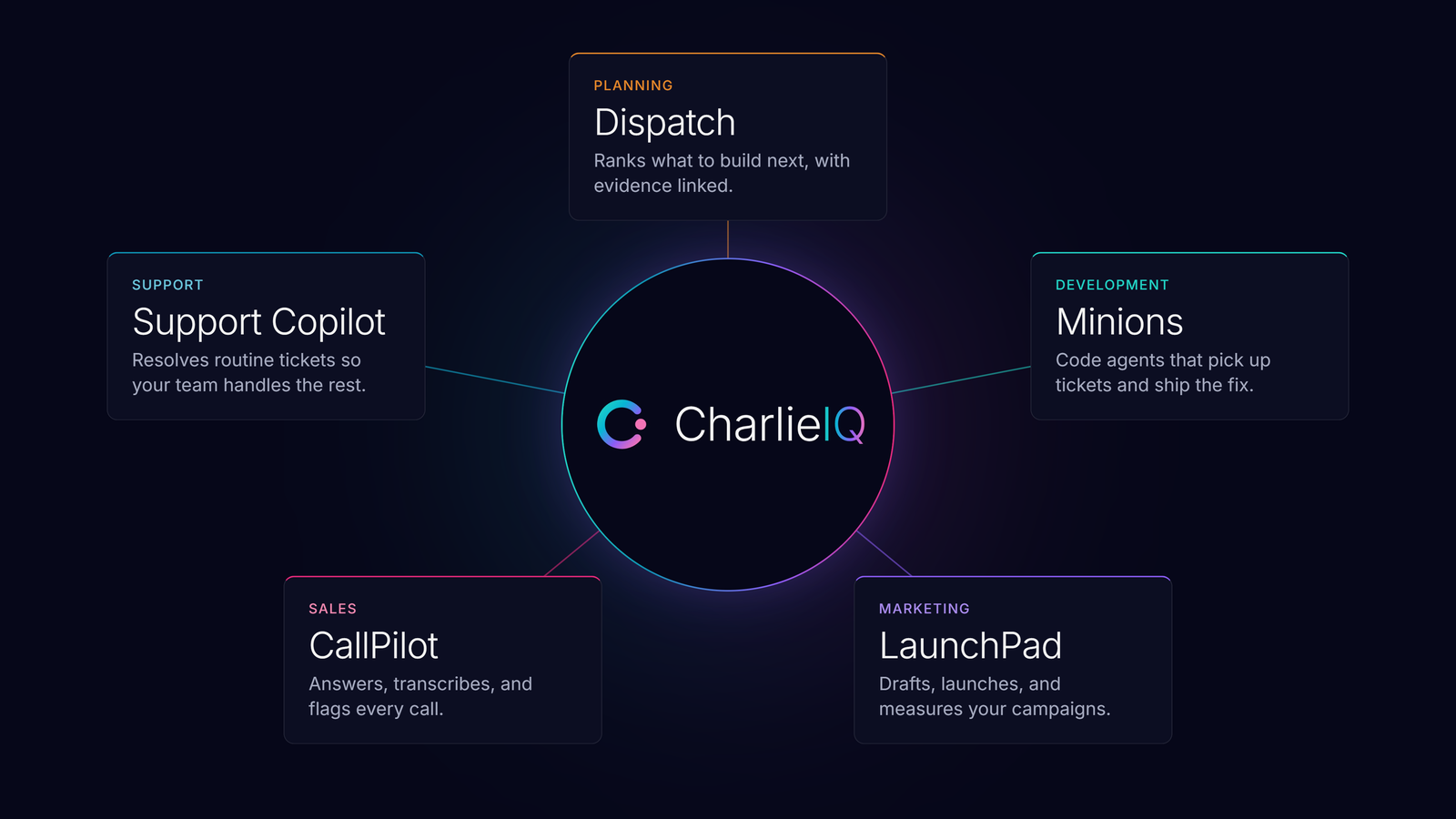
That’s what one connected system looks like across a business — not five separate tools that happen to share a vendor, but one suite where the gate in each function is different because the risk in each function is different. Run one of these on its own and it solves one team’s problem. Run more than one, and they start sharing context automatically, through the layer — CharlieIQ calls it Nexus — that lets each function see what the others already know: a shipped feature informs the campaign that announces it, which informs the pitch a rep uses on a call, which informs the support answer a customer gets three months later. That compounding effect — not any single function — is the part that’s genuinely hard to buy as five separate point tools from five separate vendors.
Three questions that tell you which one you’re buying
- Where does the output land? If the honest answer is “in the chat interface,” you’re buying a chat seat. If the answer is “in your GitHub repo, your CRM, your help desk, already there,” you’re buying an operational suite.
- Can you show me the cost per outcome, not per seat? A chat seat can only answer this in terms of logins — there’s no outcome to point to, because the output lived in a conversation that was never tied to anything. An operational suite should be able to answer in a completely different unit: the cost of a shipped feature, a sent campaign, a coached call, a resolved ticket. It’s not about how the vendor bills you — a vendor could still charge per seat and be tracking this. It’s about whether they can actually produce that number at all, because doing so requires tracking output tied to a real artifact, not just activity in a chat window.
- What stops it from running unsupervised? The weak answer is a vague one — “there’s human oversight built in,” with no specifics. The strong answer names the exact checkpoints: approval before a merge, approval before a campaign launches, a knowledge-base quality bar before a ticket closes without a person. A vendor that can’t point to the specific moment a human has to say yes hasn’t actually built a safeguard — they’ve built a talking point.
The category, not just the vendor
None of this is an argument against chat seats. They’re a real tool for a real job — individual speed. The mistake is treating them as the same category as an operational suite and expecting operational results from an individual-productivity tool.
The question worth asking before any AI evaluation isn’t “which vendor has the best model.” It’s simpler than that: am I buying something that produces conversations, or something that produces the work itself? Get that answer right, and the vendor conversation gets a lot shorter.
Frequently asked questions
What is an AI operational suite?
An AI operational suite is a connected system where AI does the actual work of a business function — writing and shipping code, drafting and sending campaigns, coaching sales calls — inside the systems that function already uses, rather than producing answers in a chat window for a person to act on manually.
How is an AI operational suite different from an AI chat seat?
A chat seat is a per-person license for conversing with AI; the output lands in a chat thread and has to be manually carried into other systems. An operational suite produces the finished artifact itself — a merged pull request, a sent campaign, a logged sales call — directly inside the tools a business already uses to track that work.
Does an AI operational suite run without human oversight?
No. A legitimate operational suite has specific human approval gates at the point where a mistake would be costly — before code merges, before a campaign publishes, before a support ticket resolves automatically — rather than running every action unsupervised.
How do you measure ROI on an AI operational suite?
Cost is tracked per outcome — per shipped feature, sent campaign, coached call, or resolved ticket — rather than per seat or per login, so leadership can see what the spend actually produced instead of just how many people are logged in.