Most sales coaching happens after the moment that needed it. A manager reviews a call recording days later, notices the rep fumbled a pricing objection, and flags it in a 1:1 the following week — long after that deal has already moved on with whatever answer the rep gave in the moment.
Coaching after the fact makes reps better at the next call. It does nothing for the one already in progress.
CallPilot is built around a different premise: the moment a rep needs the right answer is during the call, not after it. Here's what that actually looks like, from the second a call starts to the CRM update that closes it out.
Before the objection lands, CallPilot is already listening
CallPilot joins the call the way a sales engineer might sit in on a deal — either listening live through the browser mic, or as a bot that joins the Zoom, Teams or Meet call directly. There's no separate step to trigger it and no recording to upload afterward. It's present for the conversation as it happens, which is what makes everything downstream possible: real-time coaching only works if the coaching has actually heard what was just said.
CallPilot listens, but it never speaks. Nothing it produces reaches the prospect during the call. Every card appears on the rep's own screen, and the rep decides what to say.
Mid-call: prompt cards surface exactly when they're needed
This is the part that actually changes how a call goes, not just how it gets reviewed afterward. As the conversation moves, CallPilot surfaces prompt cards directly on the rep's screen — timed to what's being said, not sitting in a static sidebar the rep has to remember to check.
Picture the moment. Twenty minutes into a discovery call, the prospect says another vendor quoted them less. Without help, the rep either discounts on the spot or stalls with "let me get back to you on that." With CallPilot, a card appears on the rep's screen in the time it takes the prospect to finish the sentence: where that competitor falls short, and how to talk about the gap without sounding defensive. The rep keeps talking, and the deal keeps its footing.
The cards fall into a few categories, each solving a different mid-call failure:
- Objection handlers. The moment a prospect raises a concern — price, timeline, a feature gap — a card surfaces with a grounded response, so the rep isn't improvising against an objection they've maybe heard once before.
- Pricing answers. Questions about cost, packaging or discounting get answered from what's actually true about pricing today, not from a rep's memory of a deal structure that changed last quarter.
- Competitor battle cards. The instant a competitor's name comes up, the relevant positioning surfaces — what they do well, where the gap actually is, and how to talk about it without sounding defensive.
What makes these cards trustworthy in the moment is that they're grounded in the same Knowledge Base the rest of the suite reads from. A rep isn't getting a generic sales tip — they're getting an answer that reflects what the product, the pricing and the competitive landscape actually are right now. If something changed last week, the card reflects that, not the version a rep memorised during onboarding.
Why this matters most for reps who are still ramping
A tenured rep has heard most objections before. A newer rep is guessing under pressure, and a wrong answer given with confidence is hard to take back. A grounded card on screen replaces the guess, so a new rep can run a call closer to how a veteran would, sooner.
When the call ends, the coaching changes form
Once the call wraps, CallPilot's job shifts from real-time support to turning what happened into everything a rep and their manager need next, without anyone opening the recording again:
- A scorecard graded against a custom rubric. Instead of a generic call score, the call is evaluated against the criteria a sales org actually cares about — discovery quality, objection handling, next-step clarity, whatever the rubric defines.
- A Q&A over the transcript. Rather than scrubbing through a recording to find the moment a prospect asked about a feature or raised a concern, a rep or manager can just ask what happened and get the answer pulled from the transcript.
- A drafted follow-up email. The email a rep would otherwise write from memory — recapping what was discussed, restating next steps — is already drafted and ready for review, grounded in what was actually said.
- Prospect-facing PDFs. A recap, a comparison, a proposal — produced from the same call context, instead of a rep assembling them from scratch or reusing a deck that's slightly off for this conversation.
Summary and scorecard are generated the moment the call ends; the follow-up email and prospect materials are a click away, drafted from the same call context.
Where it lands: the CRM, without manual entry
The last mile of most sales tools is the one that quietly fails — the call happens, the coaching happens, and then nobody logs it, because logging it means a rep opening the CRM and typing out what just happened. CallPilot closes that gap with native sync to the CRM a team already runs on: HubSpot, Salesforce, Pipedrive or GoHighLevel.
The call summary, objections, sentiment and next steps land on the contact as a note, with each next step logged as a task. A manager gets visibility into deal health without asking a rep to fill out a separate form summarising a call they already had.
What this changes for a sales manager's dashboard
Because every call produces a scorecard against a consistent rubric, a manager isn't relying on which calls they happened to sit in on to know how a team is performing.
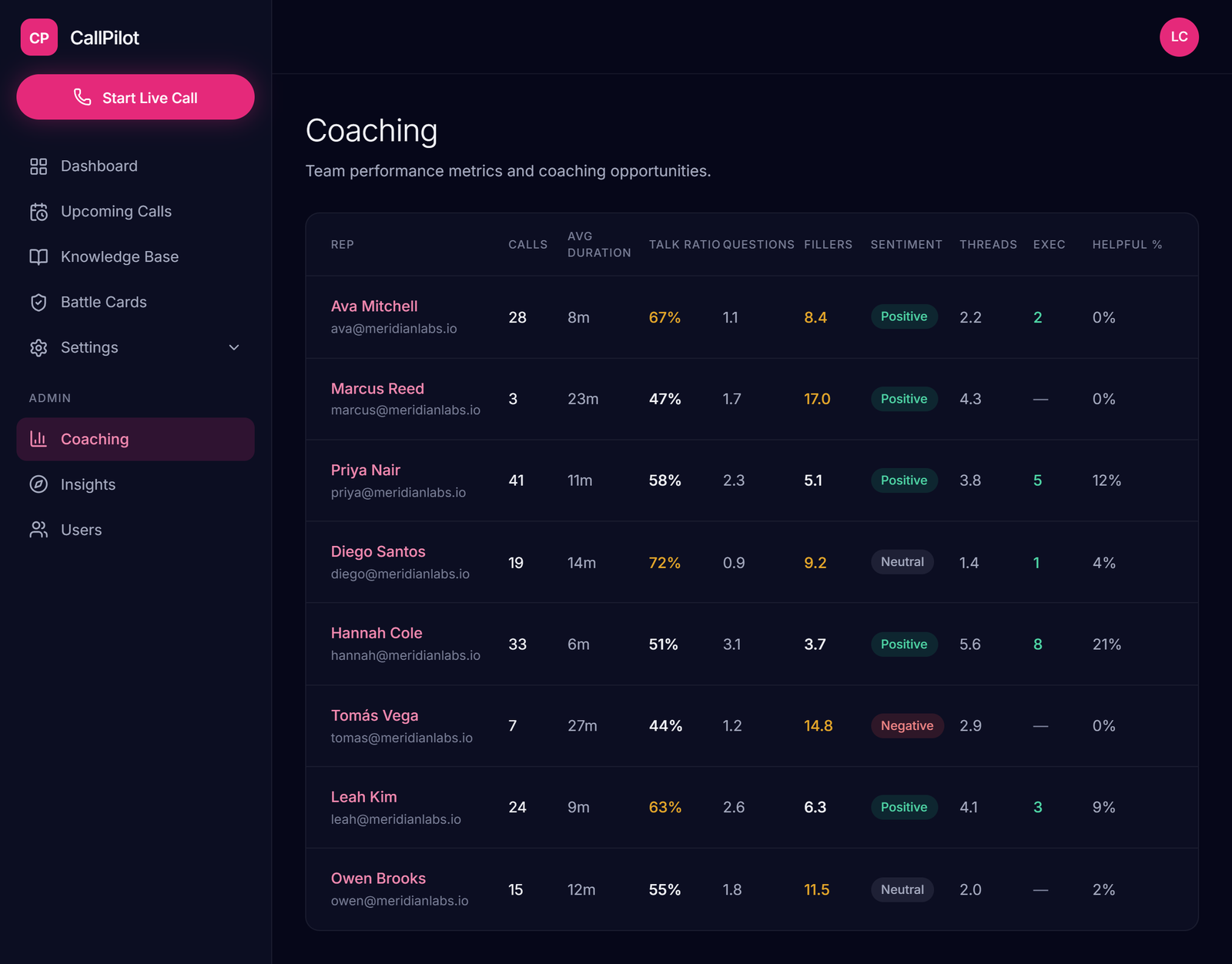
The manager dashboard aggregates scorecards across the whole team, which turns "I think our newer reps are handling pricing objections better lately" into something a manager can actually see — patterns across calls, not impressions from the ones they caught live. The manager still makes the judgment calls, but they're making them from real data instead of whichever calls they happened to catch.
The actual shift: from reviewing calls to being present in them
The old model treated coaching as something that happens to a call after it's over — a recording gets reviewed, notes get taken, feedback arrives days later. CallPilot's real-time layer doesn't replace that review; it moves the most valuable part of coaching to the only moment it can actually change the outcome: while the rep is still on the call, deciding what to say next.
Frequently asked questions
What is real-time sales coaching?
Real-time sales coaching gives a rep guidance during a live call instead of in a review days later. CallPilot listens to the conversation and shows grounded answers on the rep's screen as objections, pricing questions and competitor mentions come up.
How does CallPilot coach reps during a call?
CallPilot surfaces prompt cards on the rep's own screen, timed to what's being said. The cards cover objection handlers, pricing answers and competitor battle cards, and they appear in seconds.
Which meeting platforms does CallPilot work with?
CallPilot joins calls on Zoom, Microsoft Teams and Google Meet, either as a bot that joins the call directly or by listening live through the browser mic. It also integrates with Outlook to pull in upcoming meetings automatically.
Does CallPilot talk to the prospect?
No. CallPilot only listens, and every card appears on the rep's own screen. Nothing it produces reaches the prospect during the call, and the rep decides what to say.
Where do the answers on the cards come from?
Answers are grounded in the company's own Knowledge Base. When the Knowledge Base has nothing on point, the rep gets a general prompt for the intent rather than silence.
What happens after the call ends?
CallPilot syncs natively with HubSpot, Salesforce, Pipedrive and GoHighLevel. Scorecards, follow-up drafts and call context land in the CRM the team already uses.
How do sales managers use CallPilot?
Every call produces a scorecard against the same rubric, so a manager can see patterns across the whole team on one dashboard instead of relying on the few calls they happened to join. They can also ask questions across calls and shadow live calls.